

Use this negotiation red flags checklist to screen any Facebook Marketplace listing in 60–120 seconds and decide: inspect, verify, or walk away. The six most common warning signs are a price far below market, requests to pay off-platform, overpayment/refund requests, a seller who refuses to meet or allow inspection, a new or blank profile, and stock or stolen photos. When any of these appear, your immediate move is one of three things: pause all communication, verify any payment directly inside your own banking or payment app, or report the listing to Meta.
Top 6 red flags at a glance:
- Price is significantly below comparable sold listings
- Seller asks you to pay via Zelle, Cash App, wire transfer, or gift card
- Buyer or seller sends a payment screenshot and requests a refund of an "overpayment"
- Seller refuses to meet in person or let you inspect before paying
- Profile was created recently, has no reviews, or shows very few friends
- Photos are stock images, watermarked, or identical across multiple listings in different cities
When a red flag appears, do these three things immediately:
- Pause the conversation. Do not send money or personal information.
- Verify any claimed payment directly inside your bank or payment app, not from a screenshot.
- Report the listing to Meta if you suspect fraud, then contact your payment provider.
Pro Tip: Save these three steps as a note on your phone. When a deal feels off, glance at the note before responding.
Key Takeaways
The single most important rule on Facebook Marketplace: verify every payment directly in your own app, never from a screenshot, before you release an item or send a refund.
| Point | Details |
|---|---|
| Price too low is the top signal | A price significantly below market comps is the most reliable single red flag to act on first. |
| Screenshots prove nothing | Always confirm funds in your own bank or payment app before releasing any item or refund. |
| Off-platform requests mean abort | Any push to pay via gift card, wire, or unverified P2P app is a decisive reason to walk away. |
| Report within 24–48 hours | Acting quickly preserves chargeback and reversal options; file with Meta, FTC, and IC3 if money moved. |
| Dealflip AI automates the screen | The listing analyzer scores risk, flags duplicate photos, and surfaces scam signals before you message a seller. |
Table of Contents
- Does this listing pass the negotiation red flags checklist?
- How do you verify payment screenshots and spot refund scams?
- What seller profile and listing details should you check first?
- What are the safest payment and pickup methods for local deals?
- Which seller behaviors during negotiation signal risk?
- How do tools speed up your listing screening workflow?
- When should you abort a deal, and how do you report it?
- The checklist works best when you trust the process, not the story
- Dealflip AI automates the checklist so you can flip faster
- Sources
Does this listing pass the negotiation red flags checklist?
Run through these checks before you type your first offer. Each row maps to a single action.
| Check | Pass | Fail | Action if Fail |
|---|---|---|---|
| Price vs. market (below comparable sold listings) | ✓ | ✗ | Verify or abort |
| Profile age and reviews visible | ✓ | ✗ | Inspect profile deeper |
| Messaging tone is calm, no urgency | ✓ | ✗ | Stall and verify |
| No off-platform payment request | ✓ | ✗ | Abort |
| Original photos with serial/model visible | ✓ | ✗ | Request more photos |
| Shipping via Facebook checkout or known carrier | ✓ | ✗ | Abort or meet locally |
Three or more fails on a single listing is a strong signal to walk away. One fail in the price row alone warrants a deeper look before you engage.
Pro Tip: Right-click any listing photo and choose "Search image with Google" to run a reverse-image check in under 10 seconds. If the same photo appears on listings in Dallas, Chicago, and Miami, it's a reused image.
- For electronics, cross-check the model number on the RTINGS or manufacturer site to confirm the item exists as described.
- For vehicles, run a free VIN lookup on the NHTSA VIN decoder before you even message the seller.
How do you verify payment screenshots and spot refund scams?
Payment screenshots prove nothing. A scammer can fake a Venmo, Zelle, or PayPal confirmation in minutes using a screenshot editor. Meta warns that overpayment scams rely on fake or reversible payments, then pressure you to refund money before the original payment settles or gets reversed.
Verification workflow:
- Open your bank or payment app directly. Do not tap any link the seller sends.
- Check your actual balance or transaction history for the specific deposit.
- If the funds show as "pending," do not release the item or send a refund. Pending funds can disappear.
- Call your payment provider's support line if anything looks unclear.
- For Zelle and Cash App transactions, note that these are often irreversible once sent. Meta's safety guidance specifically recommends verifying payment status in your own app before taking any action.
Fake tracking numbers follow the same logic. A seller may paste a real-looking USPS or UPS number that belongs to an unrelated package. Always verify tracking on the USPS or UPS site directly, and confirm the destination ZIP matches yours. Security researchers at Avast document that fake tracking numbers and unauthorized third-party shippers are among the most common shipping scam tactics on Marketplace.
Pro Tip: Use PayPal Goods & Services, not Friends & Family, for any shipped deal. G&S gives you a dispute path. Friends & Family does not.
What seller profile and listing details should you check first?
A seller's profile tells you more than their listing copy does. Fraud summaries from OmniWatch identify new accounts, recycled stock photos, and identical listings across regions as consistent red flags.
- Account age: Tap the seller's name and look for the "Member since" date. An account created within the past 30 days with no reviews is higher risk, especially for high-value items.
- Friend count and activity: A profile with zero mutual friends, no profile photo history, and no public posts is a signal worth noting. It does not automatically mean fraud, but it raises the bar for verification.
- Marketplace ratings: Check the star rating and read the most recent reviews. One or two reviews that all say "great seller!" posted within days of each other can indicate fake reviews.
- Cross-listing duplicates: Search the item title on Marketplace and filter by "Nationwide." If the same photo appears under five different seller names, the listing is likely fraudulent.
Pro Tip: Copy the listing title and paste it into Google with "site:facebook.com/marketplace" removed. You'll often find the same item listed on Craigslist or OfferUp under a different name.
Step-by-step listing photo check:
- Right-click the main photo and run a reverse-image search.
- Check whether the serial or model number is visible in any photo. If not, ask the seller to send a photo of it before you make an offer.
- Compare the background, lighting, and shadows across all photos. Inconsistencies suggest photos were pulled from different sources.
- Look for watermarks, brand logos, or retailer tags that indicate a stock image.
For a deeper look at low-effort listing signals and what they mean for your risk exposure, that guide breaks down the specific patterns to watch.
What are the safest payment and pickup methods for local deals?
Safe exchanges come down to two rules: use traceable, reversible payment methods, and inspect before you pay. LifeLock by Norton recommends PayPal Goods & Services, Meta Pay, and credit cards as the safest options because they preserve dispute rights. Gift cards, wire transfers, and irreversible P2P apps remove your recourse entirely.
Preferred payment methods:
- Facebook/Meta Pay (on-platform, dispute-eligible)
- PayPal Goods & Services (buyer protection applies)
- Credit card via a secure checkout
High-risk payment methods to avoid:
- Zelle, Cash App, Venmo Friends & Family (irreversible)
- Wire transfers
- Gift cards of any kind
Pickup safety checklist:
- Choose a public, well-lit location: a coffee shop, a bank lobby, or a police station parking lot for high-value items.
- Bring a friend when buying anything over $200.
- Inspect the item fully before handing over payment. Power it on. Check serial numbers against the listing.
- Never go to a private residence for a first meeting with an unknown seller.
- For shipped deals, use Facebook's built-in checkout when available. Calculate your net margin with the Facebook Marketplace shipping fee calculator before agreeing to a price.
Which seller behaviors during negotiation signal risk?
Pressure, urgency, and emotional stories are the three most reliable negotiation warning signs. ProPublica's reporting confirms that scammers often use complex backstories to justify steep discounts and create urgency. If the explanation for a low price is elaborate, treat the listing as higher risk.
Behavioral red flags to watch for:
- "I need to sell today" or "another buyer is coming in an hour"
- Repeated requests to move to WhatsApp, Telegram, or email
- Partial payment offers ("I'll send half now and half after")
- Refusal to share serial numbers or allow inspection
- Scripted messages that feel copy-pasted
Three reply scripts you can use:
- Stall and verify: "Thanks for reaching out. I want to confirm a few details before we finalize. Can you send a photo of the serial number on the item?"
- Insist on inspection: "I'm interested, but I only buy in person after inspecting. Can we meet at [public location] this weekend?"
- Polite abort: "I appreciate your time, but this deal isn't the right fit for me right now. Good luck with the sale."
Do not:
- Share verification codes sent to your phone (this hands over your account)
- Agree to split payment across two apps
- Refund any amount before your own app confirms the original payment cleared
- Accept a shipping method the seller insists on that is not a standard US carrier
Pro Tip: Read the urgency language guide to recognize the exact phrases scammers use most often. Knowing the script makes it much harder to fall for it.
How do tools speed up your listing screening workflow?
Automated checks cut your 60–120 second checklist down to a few seconds for the most common red flags. Avast's security research notes that reverse-image detection, duplicate-listing detection, and price-vs-market alerts materially reduce time-to-decision for active flippers.
A good listing analyzer flags:
- Price vs. average resale value (ARV) with a confidence score
- Duplicate or stock photos detected across other listings
- Keywords associated with scams ("gift card," "wire," "Cash App only")
- Profile freshness and review count
- Shipping method and payment-method risk signals
Workflow with automation:
- Run the listing through an AI scanner for an instant pass/fail score.
- Apply the quick checklist above to any listing that scores borderline.
- For listings that pass both, proceed to manual verification (serial number, meet-in-person confirmation).
Dealflip AI maps directly to this workflow. Its listing analyzer scores each Facebook Marketplace listing on price vs. resale value, flags duplicate images, and surfaces scam signals before you send a single message. The deal finder alerts you to fresh underpriced listings in your target categories, so you spend your time on deals that already pass the first filter. For active flippers running 10–30 searches a day, that automation replaces a significant chunk of manual screening.
When should you abort a deal, and how do you report it?
Some red flags are decisive. Stop the deal immediately if you see fake payment proof, a refusal to allow inspection, an insistence on an unauthorized shipping service, or repeated overpayment requests. Acting within 24–48 hours preserves your best options for a reversal or chargeback, according to OmniWatch's fraud guidance.
Abort now if:
- The seller sends a payment screenshot but your app shows nothing
- The seller refuses to meet or share a serial number after two requests
- You receive a request to refund an overpayment before funds clear
- The seller insists on a shipping company you cannot verify
Step-by-step reporting flow:
- Stop all communication. Do not send any more messages.
- Screenshot the full message thread, the listing, the seller's profile, and any payment screenshots.
- Report the listing and user to Meta using the in-app reporting tools. Meta's reporting process reviews flagged content and can remove policy-violating listings.
- Contact your bank or payment provider immediately if money moved.
- File a report with the Reportfraud and with the Ic3 if financial loss occurred.
- File a local police report for losses above a few hundred dollars. Your report number supports any chargeback or dispute claim.
What to document:
- Full message thread with timestamps
- Screenshots of any payment confirmation images the seller sent
- Seller profile URL and listing URL
- Any tracking numbers provided
- Date and time of all interactions
The checklist works best when you trust the process, not the story
The most experienced flippers I know do not spend extra time analyzing a deal when the story is compelling. They spend it when the story is too compelling. A seller with a heartfelt reason for the low price, a tight deadline, and a preference for Cash App is not a great deal. It is a script.
The real edge in reselling is not finding the best deals. It is filtering out the bad ones fast enough that you have time and capital left for the good ones. A 90-second checklist run on every listing is not caution. It is efficiency.
One heuristic worth keeping: after you find a price that looks attractive, subtract your realistic repair or cleaning cost, your selling fees, and your time. If the margin still holds, the deal is worth pursuing. If it only works at the asking price with zero friction, it probably will not work at all.
For more field-tested screening tactics, the offer negotiation tactics checklist on the Dealflip AI blog covers counter-offer frameworks that protect your margin while keeping the conversation open.
Dealflip AI automates the checklist so you can flip faster
Manually running a negotiation red flags checklist on every listing takes time. Dealflip AI does the heavy lifting: it scans Facebook Marketplace listings for price vs. resale value, flags duplicate images, detects scam-signal keywords, and scores each listing's risk before you ever open a conversation.
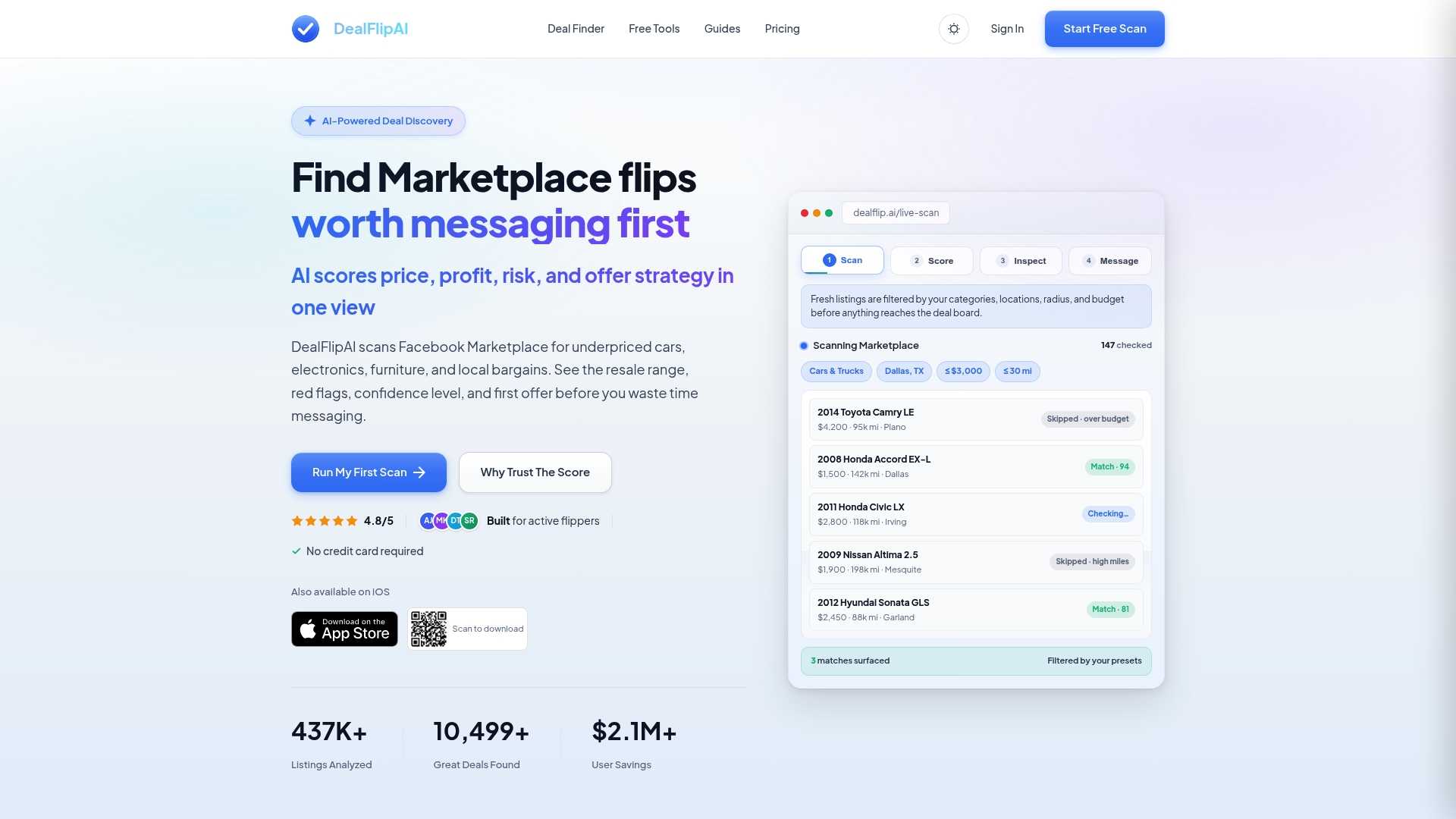
Active flippers get real-time alerts for fresh underpriced listings in their target categories, a built-in flip profit calculator to confirm margin before making an offer, and a listing analyzer that surfaces the exact red flags covered in this checklist automatically. The free plan gives you a taste of the workflow. Paid tiers scale with your scan volume and category depth. Head to Dealflip AI to run your first free listing scan and see the risk score for yourself.
Sources
Primary research sources used in this checklist:
- Scam Protection Center | Meta
- How to Avoid Being Scammed on Facebook Marketplace — ProPublica
- Facebook Marketplace Scams: How to Spot Them & Stay Safe
- Facebook Marketplace scams: 12 scams to know and how to avoid every one — LifeLock by Norton
- Facebook Marketplace Scams: 12 Scams to Know and How to Avoid Every One
Dealflip AI tools for resellers:
Fraud reporting resources: