

Stock photos usually signal a fraudulent listing because they show the seller does not actually have the item or property. That one fact explains most of the scam patterns you will encounter on Facebook Marketplace, eBay, Craigslist, and rental sites. Legitimate sellers photograph what they own; scammers grab polished images from Shutterstock or Getty Images because they have nothing real to show you.
If you are a buyer and spot stock photos, do this right now:
- Ask for a photo of the item next to a handwritten note with today's date and your name.
- Request a short video or live video call showing the item in person.
- Never wire money or pay via gift card before verifying ownership.
If you are a seller using stock or licensed images, fix this quickly:
- Add at least two original photos showing the actual item, including one with a personal detail (serial number, wear marks, your hand holding it).
- State clearly in the listing text that any polished images are licensed stock, not photos of the specific item.
- Keep your purchase receipt or proof of ownership ready to share if a platform flags your listing.
Table of Contents
- Why stock photos make buyers suspect fraud
- How platforms enforce stock-photo signals: VERO, takedowns, and policies
- How to tell stock photos from originals using visual and technical checks
- Step-by-step checklist for buyers who spot stock photos
- How legitimate sellers can use stock images without being flagged
- What EXIF and IPTC metadata actually tell you about an image
- What happens after you report a suspicious listing
- Key Takeaways
- The stock-photo false positive problem sellers rarely talk about
- Dealflip AI catches these signals before you waste time on a bad deal
- Useful sources and tools for deeper verification
Why stock photos make buyers suspect fraud
Stock images suggest the seller does not possess the physical item, which is the single most common pattern in counterfeit product sales and phantom rental scams. When you see a perfectly lit, white-background product shot or a magazine-quality apartment interior in a private-sale listing, your instincts are picking up on something real: those images were not taken by someone who owns the thing being sold.
The psychological effect is just as important. Professional images create a mismatch when the price is suspiciously low or the seller is a private individual. Your brain registers the dissonance even if you cannot name it. A $400 iPhone listing with a flawless Apple press photo feels off because real sellers photograph their actual phone, scratches and all.
Three scam patterns rely heavily on stock imagery:
- Phantom rentals. A scammer posts a beautiful apartment using photos pulled from a real estate agency's portfolio or a stock library. The property may not exist, or the scammer has no connection to it. Fake rental listings fall into two categories: hijacked listings (real property, fake contact) and fabricated listings (property does not exist), and fabricated listings almost always use stock or AI-generated photos.
- Fake product listings. Electronics, sneakers, and luxury goods are common targets. The listing shows a manufacturer's press image, the buyer pays, and nothing arrives.
- Hijacked listings. A scammer copies a legitimate ad, swaps the contact details, and re-posts it. The photos look real because they were real, just stolen from someone else's honest listing.
Legitimate uses of stock images do exist. A brand's official storefront on eBay or Amazon often uses manufacturer photos, and that is normal. A property management company may use professionally staged photos for a unit that has not yet been photographed after renovation. The key difference is context: a business account with a history, reviews, and a clear brand identity is very different from a private seller with zero feedback posting studio-quality images of a used couch.
Industry guides flag specific visual giveaways: white studio backgrounds, perfect staging with no personal effects, and furniture that looks too expensive for the asking price. When you see those signals in a private-sale listing, treat them as red flags in listings until you can verify otherwise.

How platforms enforce stock-photo signals: VERO, takedowns, and policies
Marketplace platforms do not wait for buyers to complain. Automated filters scan photo patterns, flag rapid reposts of identical images, and route suspicious listings for human review. A single stock-photo signal rarely triggers an instant takedown on its own, but it raises a listing's priority in the review queue.
eBay's VERO program (Verified Rights Owner) is the clearest example of brand enforcement overlapping with fraud detection. Rights holders, including major stock agencies like Shutterstock and Getty Images, can file VERO complaints when their licensed images appear in unauthorized listings. The typical flow: the rights owner submits a complaint, eBay removes the listing, and the seller receives a notice with options to file a counter-notice if they believe the removal was an error. Repeated VERO violations can lead to account suspension.
Platform enforcement is often a mix of automated heuristics (photo patterns, rapid reposts) and rights-owner complaints through programs like VERO. A single image signal rarely drives enforcement alone, but it raises a listing's priority for review and can accelerate a takedown when combined with other risk signals.
Facebook Marketplace uses a different approach. Its automated systems look for image hashes that match known stock libraries and flag listings where the same photo appears across multiple unrelated accounts. Sellers who use licensed images without disclosure can find their listings removed without a formal VERO-style complaint process, often with less transparency about the reason.
For buyers, the practical takeaway is this: a listing that survives platform review is not automatically legitimate. Automated filters catch patterns, not every individual scam. Your own verification steps still matter.
How to tell stock photos from originals using visual and technical checks
You do not need special software to catch most stock-photo fraud. A few free tools and a trained eye will handle the majority of cases.
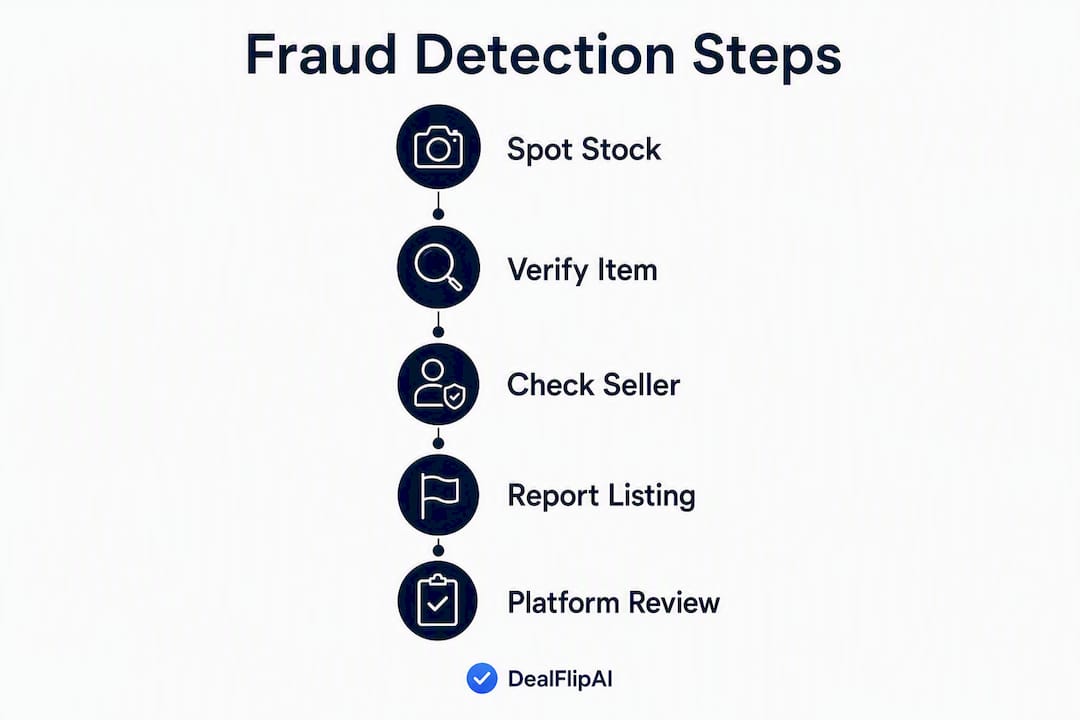
Step-by-step verification process:
- Run a reverse-image search. Right-click any listing photo and open it in Google Lens or drag it to TinEye. TinEye is particularly useful because it shows the earliest known appearance of an image online. If the photo traces back to a Shutterstock or Getty Images page, or to a different seller's listing from two years ago, you have your answer.
- Check EXIF/IPTC metadata. Use a free EXIF viewer (Jeffrey's Exif Viewer at exifdata.com works well) to inspect the image file. Look for the camera make and model, the copyright field, and the creator field. An image tagged "© Photographer Name / Shutterstock" or showing a professional camera body like a Canon EOS R5 in a listing for a used blender is a strong indicator of stock.
- Inspect for watermark remnants. Zoom in on edges, corners, and mid-image areas. Scammers who strip watermarks often leave repeating diagonal patterns or smudged patches where cloning tools were used. These artifacts are subtle but present more often than you might expect.
- Compare lighting and perspective across the gallery. Authentic listings usually have consistent lighting, similar backgrounds, and a coherent shooting environment. A gallery that mixes professional studio shots with one blurry phone photo is a sign of "frankensteining," where a scammer adds one token original to a mostly stolen gallery.
- Cross-check the address with Google Street View. For rental or real estate listings, compare the exterior photos to Street View. Architectural mismatches in roof style, siding, or window arrangements are strong evidence that the photos were taken at a different property entirely.
Tools at a glance:
| Method | Speed | Reliability | Common bypass |
|---|---|---|---|
| Google Lens / Google Reverse Image Search | Fast (seconds) | High for unedited images | Cropping, color shifts |
| TinEye | Fast (seconds) | High; shows earliest use | Minor edits, re-uploads |
| Yandex Images | Fast (seconds) | Strong for Eastern European stock | Less effective for US-only libraries |
| EXIF/IPTC viewer | Fast (seconds) | High when metadata is intact | Metadata can be stripped |
| Google Street View cross-check | 1–2 minutes | Very high for address fraud | Does not apply to product listings |
Pro Tip: Advanced scammers defeat reverse-image search by cropping, flipping, or color-shifting images. Always run at least two engines, and combine the results with a Street View check for address-based listings. If both TinEye and Yandex come back clean but the image still looks too polished, check the EXIF data before trusting it.
Step-by-step checklist for buyers who spot stock photos
Finding stock photos in a listing does not mean you walk away immediately. It means you verify before you commit. Here is the order that gives you the most protection with the least effort.
- Request original photos with a specific, time-stamped detail. Ask the seller to send a photo of the item next to a piece of paper showing today's date and your username. A legitimate seller will do this without hesitation.
- Ask for a short video or live walkthrough. A 30-second video showing the item from multiple angles, or a live video call, is very hard to fake. Scammers almost always refuse or make excuses.
- Confirm the address with Street View. For rentals or large items requiring pickup, verify the exterior matches the listing photos before you drive anywhere.
- Run a reverse-image search on every photo. Use Google Lens and TinEye. If any image traces back to a stock library or a different listing, stop.
- Ask for invoice or ownership proof. A receipt, title, or registration document is easy for a real owner to photograph and share. Scammers rarely have these.
- Pay through the platform, never off it. Facebook Marketplace's payment system and eBay's checkout both offer buyer protections. Wiring money, paying via Zelle, or sending gift cards removes all recourse if the deal is fraudulent.
- Meet in a public place or use a verified pickup option. Many police departments now offer "safe exchange zones" in their parking lots for exactly this purpose.
The FTC advises treating verification as three separate checks: the listing itself, the property or item, and the person collecting payment. A convincing listing does not clear the seller's identity, and a friendly seller does not clear the listing's photos.
If the seller refuses original photos, pushes you toward off-platform payment, or creates urgency ("I have three other buyers"), report the listing to the platform and walk away. You can learn how to spot scam listings on Facebook Marketplace in more detail if you want a deeper breakdown of those pressure tactics.
How legitimate sellers can use stock images without being flagged
Using a licensed stock image is not automatically wrong. Presenting it as a photo of your specific item is. That distinction is where most accidental enforcement actions happen.
Do these things:
- Always include multiple original photos. Even one clear phone photo of the actual item, in your own space, signals real ownership. Two or three is better.
- Include at least one photo with a personal identifier. A serial number, a visible wear mark, your hand holding the item, or a handwritten note with your username and the date. This one step prevents most false-flag situations.
- Disclose licensed images explicitly in the listing text. Something like "Cover photo is a manufacturer image; see additional photos for the actual item" is clear, honest, and protects you from VERO complaints.
- Keep proof of ownership ready. A receipt photo, a screenshot of your original purchase, or a title document. If a platform flags your listing, you want to respond quickly with evidence.
- Use watermarked or brand-specific shots where appropriate. If you are a business seller, your own branded product photos are far safer than third-party stock.
Avoid these mistakes:
- Do not present a licensed stock image as a photo of your specific item in a private sale. This is inherently dishonest and creates real legal exposure under copyright law.
- Do not attempt to remove watermarks from stock images. The artifacts left behind are a red flag for both buyers and platform filters, and the act itself is a copyright violation.
- Do not post a gallery of only perfect stock shots with no originals. Even if your item is genuine, buyers will assume the worst.
A short video showing you handling the item, a photo with a handwritten sign and today's date, or a screenshot of your purchase invoice alongside the listing text will resolve most buyer skepticism before it starts. Low-effort listings consistently signal higher risk to resellers, and the fix costs you about five minutes.

What EXIF and IPTC metadata actually tell you about an image
EXIF (Exchangeable Image File Format) and IPTC (International Press Telecommunications Council) metadata are embedded in most image files and contain information about how and where a photo was taken. For fraud detection, three fields matter most.
Camera make and model. A photo in a private-sale listing that was shot on a Canon EOS R5 or a Nikon Z9 is almost certainly professional stock. Real sellers use phones. A Samsung Galaxy or iPhone camera tag is normal; a $3,000 mirrorless body is not.
Copyright field. Stock agencies embed their copyright strings directly into the file. A string like "© John Smith / Shutterstock" or "Getty Images" in the copyright field is definitive proof of stock origin. These agency provenance strings are strong indicators that the image was not taken by the person selling the item.
Creator and agency fields. IPTC creator fields often include the photographer's name and the distributing agency. Cross-referencing that name against the stock agency's contributor database takes about 30 seconds.
Media forensics investigations, including the SalamPix affair, show that professional-looking imagery can be injected into trusted distribution chains, making "agency privilege" a vulnerability rather than a guarantee. A polished, professionally sourced image is not automatically authentic — it may have traveled through a legitimate pipeline before being misappropriated.
The hard limits of metadata checks: EXIF data can be stripped with a single click in any image editor, and AI-generated images typically have no camera EXIF at all because no camera took them. A blank metadata record is not proof of authenticity; it just means the file was processed. AI-generated images are increasingly convincing and increasingly common in fraudulent listings, which is why visual checks and reverse-image search remain necessary even when the metadata looks clean.
Pro Tip: Search the copyright string from the EXIF field directly in Google. If it returns a stock agency contributor page or a licensing portal, the image is stock. Combine that with TinEye's earliest-use date to build a clear picture of provenance before you make any payment.
What happens after you report a suspicious listing
Reporting a listing is not the end of the process. Here is what to expect and how to protect yourself while the platform acts.
For buyers: After you submit a report, most major platforms run an automated review first. On eBay and Facebook Marketplace, this can result in a temporary hold on the listing within hours if the automated system flags it. More complex cases, especially those involving VERO or copyright complaints from agencies like Shutterstock or Getty Images, go to a human review team and can take several business days. During that time, save screenshots of the listing, the seller's profile, and any messages you exchanged. If the listing is taken down and reposted under a new account, report the new listing and reference the original in your report notes.
For sellers who are wrongly flagged: Respond to the platform's notice quickly. Attach your proof of ownership (receipt, invoice, title), a photo of the actual item with a date reference, and a clear explanation of why any stock images were used. Counter-notices on eBay VERO complaints require you to affirm under penalty of perjury that the removal was an error, so be accurate.
Platform response times vary. Large marketplaces like eBay and Facebook Marketplace have faster automated systems, but rights-owner disputes through VERO can take longer because the rights holder must respond to your counter-notice. Smaller platforms and classified sites often rely on manual review, which means slower timelines and less predictable outcomes.
One practical step buyers often skip: after reporting, check whether the same photos appear in other active listings. Scammers frequently run multiple fake listings simultaneously. Finding and reporting those connected listings speeds up enforcement and protects other buyers.
Key Takeaways
Stock photos in a private-sale listing almost always indicate the seller does not possess the item, making them the single most reliable red flag for fraud across every major marketplace.
| Point | Details |
|---|---|
| Stock photos signal non-possession | A seller using polished stock images likely does not own the item; this is the core fraud signal. |
| Use multiple verification methods | Combine reverse-image search (Google Lens, TinEye), EXIF checks, and Street View for reliable results. |
| Buyers should verify three things | Check the listing, the item or property, and the person separately; a clean listing does not clear the seller. |
| Sellers must add original photos | At least one original photo with a personal identifier prevents false flags and builds buyer trust. |
| Dealflip AI automates these checks | Dealflip AI's scam detection scores listings for risk signals, including photo authenticity, before you commit. |
The stock-photo false positive problem sellers rarely talk about
The fraud-detection conversation almost always focuses on buyers, but legitimate sellers get caught in the crossfire more often than platforms acknowledge. A reseller who sources a sealed-box product and photographs it against a clean white background can trigger the same automated flags as a scammer using manufacturer press images. The visual signals overlap almost perfectly.
What actually separates a legitimate reseller from a fraudster in these cases is not the photo quality; it is the supporting evidence. A seller who adds a dated selfie holding the item, attaches an invoice screenshot, and writes "licensed manufacturer image used for clarity; see photo 3 for the actual unit" in the listing text will almost never face a sustained enforcement action. The platform's human reviewers are looking for effort and consistency, not perfection.
The broader lesson for buyers is worth sitting with: do not treat a single clean photo as proof of fraud any more than you treat it as proof of legitimacy. A polished image is a signal to investigate further, not a verdict. The verification steps in this article exist precisely because no single check is definitive. The sellers who get wrongly flagged are usually the ones who skipped the five-minute step of adding one honest original photo. The scammers who slip through are the ones who added just enough original-looking content to pass a surface check.
Both problems have the same solution: more verification, not less.
Dealflip AI catches these signals before you waste time on a bad deal
Spotting stock photos manually takes time, and scammers keep getting better at evading single-method checks. Dealflip AI's listing analyzer runs automated image checks, cross-references photos against known stock patterns, and scores each listing for risk before you ever message a seller.

The platform's scam detection layer flags the specific signals covered in this article: mismatched image quality in a gallery, metadata inconsistencies, rapid reposts of identical photos across accounts, and geodata mismatches between a listing's claimed location and its image data. Each risk factor feeds into a deal score that tells you, at a glance, whether a listing is worth pursuing or worth skipping.
For active resellers on Facebook Marketplace, that means fewer wasted conversations and fewer close calls with phantom listings. Run a free scan with the Facebook Marketplace scam checker on any listing that looks too good, and let the AI do the verification work that would otherwise take you 15 minutes per listing.
Useful sources and tools for deeper verification
Use these directly when you need to verify a listing or report abuse:
- Google Lens — reverse-image search built into Google; fast and effective for unedited images.
- TinEye — shows the earliest known appearance of an image; strong for catching reused stock.
- FTC rental listing scam guidance — authoritative advice on verifying listings, properties, and sellers separately.
- DC Attorney General fake listing advisory — government-level breakdown of hijacked and fabricated listing patterns.
- Marketplace terms and governance — useful background on how platform policies handle image-based fraud.
- Product authenticity and resale infrastructure — covers provenance verification at scale for resellers.
- Dealflip AI red flags guide — deeper examples of photo-based red flags across marketplace categories.
- Dealflip AI free tools — listing analyzer, scam checker, and profit calculators in one place.